
Drawer
Components
Checklist
Documentation
Checklist
Reset
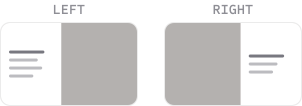
Placement
Which edge the drawer slides from - most commonly from left (navigation) or right (details/settings)
Dimensions
Typically full height, but width can vary. Should be wide enough for complex content to be shown, without taking over the entire page
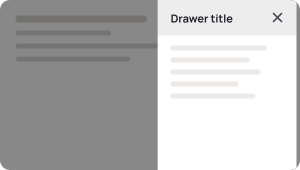
Overlay
A semi-transparent background for the remaining screen area to bring focus to the drawer
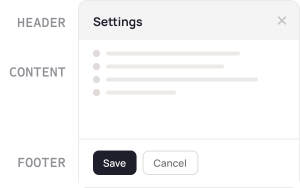
Header
Top section with a title describing drawer contents or purpose, along with a close action (optional)
Can also include a description of drawer contents if header is too simple
Content area
Main section, which should be scrollable if content exceeds window height
Open and close trigger
How user activate the drawer — typically a button to open, while closing can have multiple ways: clicking overlay, a close button, or pressing Esc on keyboard should all be active options
Footer
Fixed area at the bottom for actions, usually a primary and secondary e.g. Save & Cancel
BETA
Less debating, more deciding.
Quorum is a design voting platform that gives you immediate, quantified feedback to iterate with confidence.